

Supercreator wordmark (screenshot from supercreator.app)
Most tools sold to OnlyFans agencies are described by what they can send. The Supercreator AI Chatter is more interesting for what it refuses to send, who it hands a conversation to, and how much of that you get to decide in advance. The Supercreator AI Chatter has a name on the product pages – Izzy – and seven separate control surfaces sit around the Supercreator AI Chatter, each with its own documentation page. This review walks through the Supercreator AI Chatter controls one at a time, using the numbers the company publishes, and notes three places where two of its own pages say different things.
If you want to look at the plans yourself while you read, the Supercreator pricing and plan pages are open to anyone. Nothing below requires an account.
What the Supercreator AI Chatter is, and why it has a first name
Supercreator is a management layer for OnlyFans accounts: a CRM, a shared inbox, analytics, and a desktop app. The Supercreator AI Chatter is the piece that writes and sends messages on its own. On the product pages it is always referred to by a first name, Izzy, and described in the third person: “Meet Izzy, your personal OnlyFans AI chatbot that never sleeps.”
That naming convention matters for a practical reason rather than a stylistic one. Every Supercreator AI Chatter setting is written as an instruction to a person – her schedule, her chat rules, her restricted words, the moments she hands over. Reading the documentation is therefore a fairly quick way to see exactly where the operator keeps authority and where the Supercreator AI Chatter takes it. The company states that 25,000 creators and agencies use the platform, and the AI Chatter page puts monthly sales processed through it at roughly 180 million dollars. Both are company figures, not audited numbers, and the review treats them as claims.
Seven controls that make up the Supercreator AI Chatter
The seven modules, each with its own documentation page (screenshot from supercreator.app)
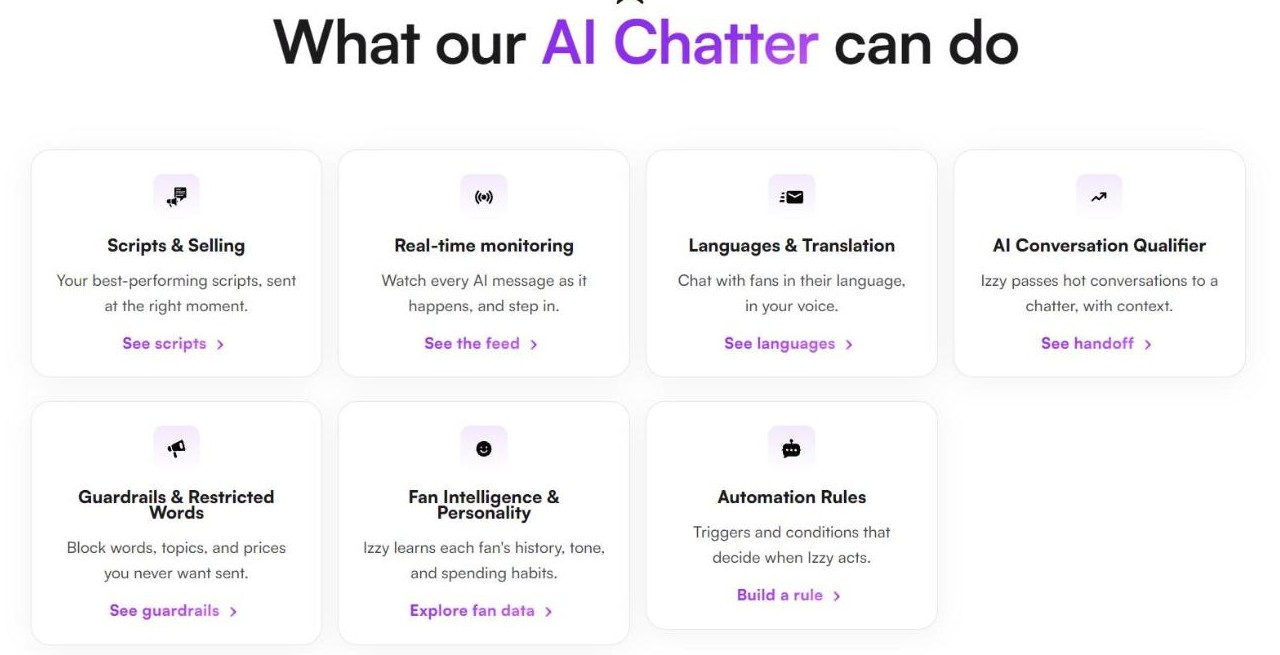
The product page splits the Supercreator AI Chatter into seven modules, and each one has a dedicated page with its own settings. That Supercreator AI Chatter structure is unusually transparent for this category, because it means the limits are written down rather than implied:
| Module | What it controls |
| Scripts & Selling | Message sequences that start on a trigger you write as a sentence |
| Real-time monitoring | A live event feed covering every account in the workspace |
| Languages & Translation | Which languages are allowed, plus inbox-wide translation |
| AI Conversation Qualifier | The rules for handing a chat to a human chatter |
| Guardrails & Restricted Words | Words, topics and prices that must never be sent |
| Fan Intelligence & Personality | What it remembers about each fan, and whose voice it uses |
| Automation Rules | Schedule, selling intensity, and who it is not allowed to talk to |
Setting up the Supercreator AI Chatter, in the four steps the company publishes
The sequence on the product page is short. Step one connects the Supercreator AI Chatter to a Supercreator account so it can read messages, sales history and fan profiles. Step two is where the rules go in – when it should be active, which fans it should talk to, how it should respond. Step three turns it on. Step four is the dashboard, where the company says you can adjust tone, update training, or pause the Supercreator AI Chatter at any time.
Two details in that flow are worth pulling out because they come up again later. Onboarding includes a period where every message the Supercreator AI Chatter writes can be reviewed before it is sent – the FAQ puts it as “you can review all AI conversations before they are sent.” And the same FAQ says you can cap the number of chats it handles until you are satisfied with its performance. Both are described as part of the standard onboarding rather than as paid extras.
Guardrails: the words the Supercreator AI Chatter will never use
Three stacked lists, with published caps (screenshot from supercreator.app)
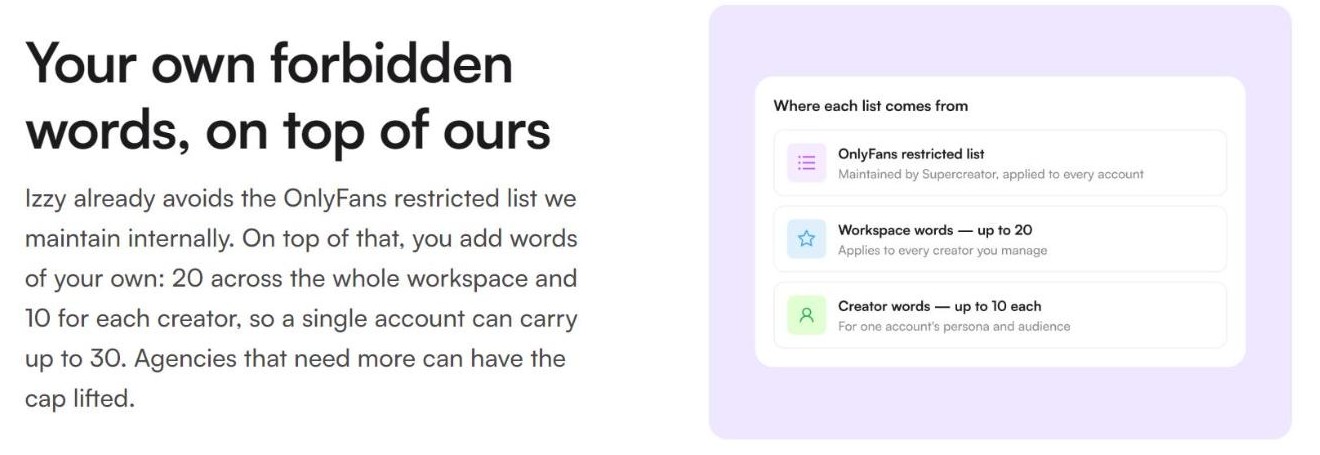
This is the Supercreator AI Chatter page with the most concrete numbers on it, and they are small enough to plan around. Three lists stack on top of each other. The first is an OnlyFans restricted list that Supercreator says it maintains internally and applies to every account. The second is a workspace list of your own, capped at 20 words. The third is a per-creator list capped at 10. The page states the arithmetic itself: “a single account can carry up to 30. Agencies that need more can have the cap lifted.”
Thirty custom banned words is a real constraint if you manage several personas with different vocabularies, and it is the kind of number that usually only appears after you have signed up. Finding it on a public page is a point in the product’s favour, and the escape hatch – ask and the cap is raised – is stated in the same sentence.
A separate list, written in the creator bio rather than in the guardrail settings, covers subjects the Supercreator AI Chatter should never raise at all. The page suggests three uses for it: well-known creators whose fans would notice anything out of character, cultural sensitivities, and keeping competitor names out of the chat.
The twelve moderated categories, published in full (screenshot from supercreator.app)
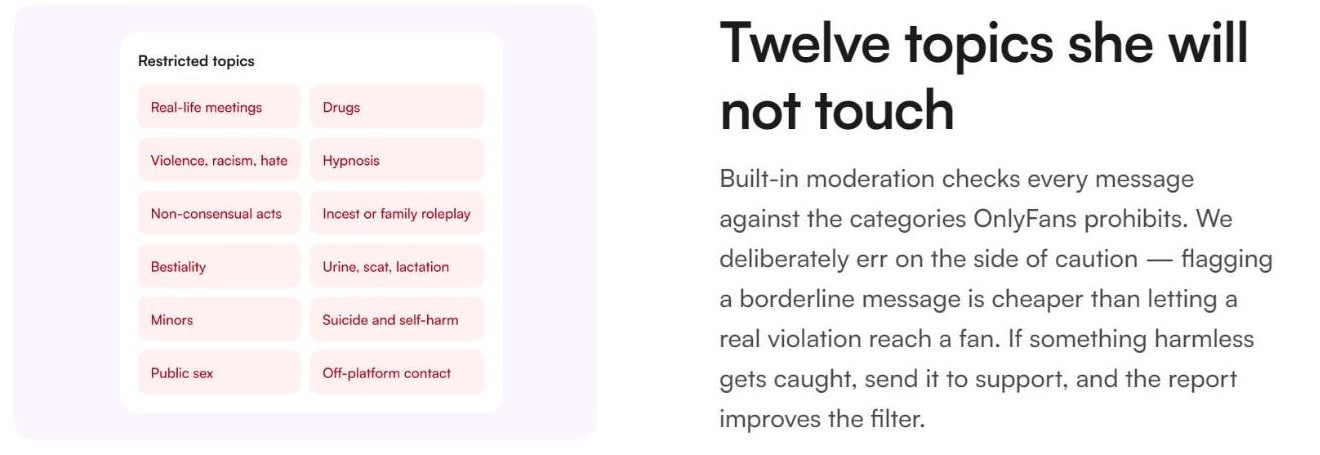
Underneath the word lists sits a Supercreator AI Chatter moderation layer that checks every outgoing message against twelve categories: real-life meetings, drugs, violence and racism and hate, hypnosis, non-consensual acts, incest or family roleplay, bestiality, urine and scat and lactation, minors, suicide and self-harm, public sex, and off-platform contact.
The company is explicit about the trade-off it has chosen: “We deliberately err on the side of caution – flagging a borderline message is cheaper than letting a real violation reach a fan.” It also gives a route for the other direction, asking you to send harmless messages that got caught to support so the filter improves. Publishing the whole list, including the uncomfortable entries, is more useful than a vague promise of moderation.
Finding one: invisibility and disclosure, on the same page
The AI Chatter FAQ answers the question “Does it sound like a bot” with a flat claim: “Your fans won’t be able to tell the difference – they’ll just enjoy faster, more engaging interactions that feel personal and genuine.” Nine questions later, the answer to “Does it go against the terms of use of OnlyFans” reads: “AI Chatter operates within OnlyFans’ terms of service. We recommend always being transparent with your fans about the use of AI assistance.”
Those two sentences live on the same page, a few hundred pixels apart. The first is a capability claim, the second is advice, and they do not have to be read as a contradiction – a tool can be convincing and still be disclosed. But a buyer choosing between the two readings is choosing a business model, not a setting, and the page does not resolve it for them.
A third page makes the tension concrete. The Automation Rules documentation lists the situations that cause the Supercreator AI Chatter to escalate on its own, and one of them is “a fan questioning who they’re talking to.” The behaviour is sensible, and it is also an admission that the question gets asked. Readers can check all three passages themselves in a couple of minutes on the vendor’s own site.
When the Supercreator AI Chatter hands the chat to a person
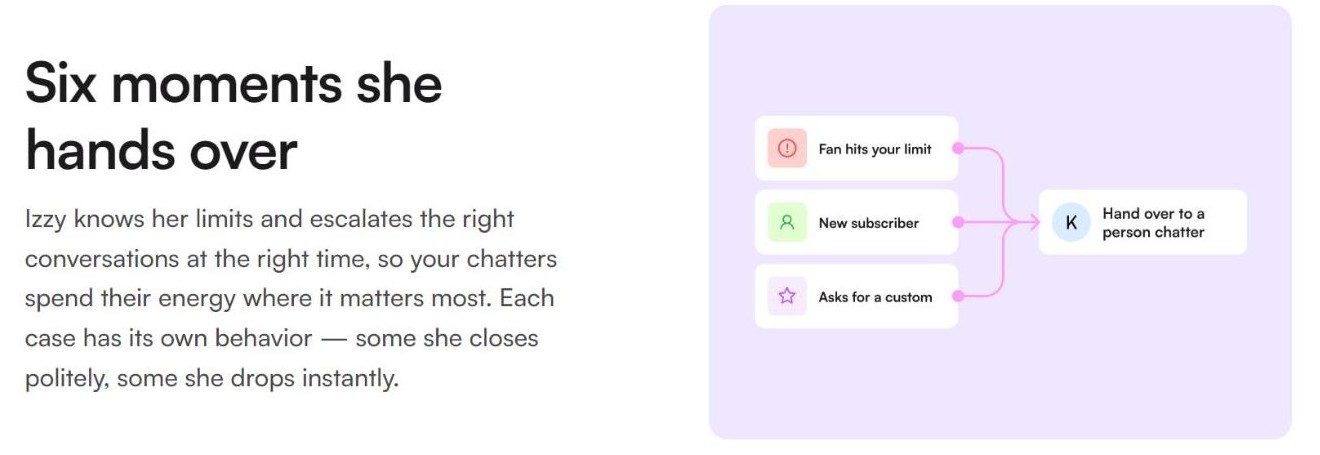
Escalation routes into a human chatter (screenshot from supercreator.app)
The AI Conversation Qualifier page is headed “Izzy Knows When to Get a Human” and describes six moments where the Supercreator AI Chatter steps back, with the published diagram illustrating three of them: a fan hitting your spending limit, a new subscriber, and a request for custom content. The page notes that each case has its own behaviour – “some she closes politely, some she drops instantly.”
What happens next is the part worth paying for. An escalated conversation jumps to the top of the inbox, fires a push notification on the mobile app, and lands in a queue in the desktop app’s notifications dropdown. Which roles get alerted is part of the access settings, so owners and chatters can be treated differently. There is also an Izzy Escalations trigger inside Message Flow, so an escalation can start an automated sequence – hold the fan with a holding message, tag them onto a list, route the chat – instead of waiting for somebody to notice.
Exclusion rules run in the other direction: whole groups of fans can be kept away from the Supercreator AI Chatter entirely. The documentation names spenders above a threshold, brand-new subscribers, long-term VIPs, and any custom fan list. For an agency, that is the setting that decides which relationships stay human by policy rather than by luck.
Finding two: unlimited conversations, metered messages
The FAQ is unambiguous on volume: “No limits! AI Chatter can handle an unlimited number of conversations simultaneously, 24/7.” Read on its own, that sounds like a flat fee with no ceiling.
The pricing page tells a more detailed story. The AI plan ships with a monthly credit allowance – 2,000 credits a month at the lowest earnings band, 6,000 at the highest – and lists additional AI messages at “3 cents or lower.” The real-time monitoring page closes the loop: “low-credit warnings” are one of the event types that stream into the live feed, and a separate section is headed “Warned before she stops.”
| What is counted | What the pages say |
| Conversations handled at once | Unlimited, per the FAQ |
| Messages included each month | 2,000 credits at the lowest band, 6,000 at the highest |
| Messages beyond the allowance | 3 cents each or lower |
| Where you find out | Low-credit warnings in the live monitoring feed |
Both statements are true at once: conversations are not capped, messages are metered. The arithmetic is easy and nobody is hiding it – 6,000 extra messages at three cents is roughly 180 dollars on top of the seat price – but you only get it by reading two pages together. Anyone budgeting from the FAQ alone will be surprised by their second invoice, and that is worth knowing before you sign up rather than after.
How hard the Supercreator AI Chatter sells, and the hours it keeps
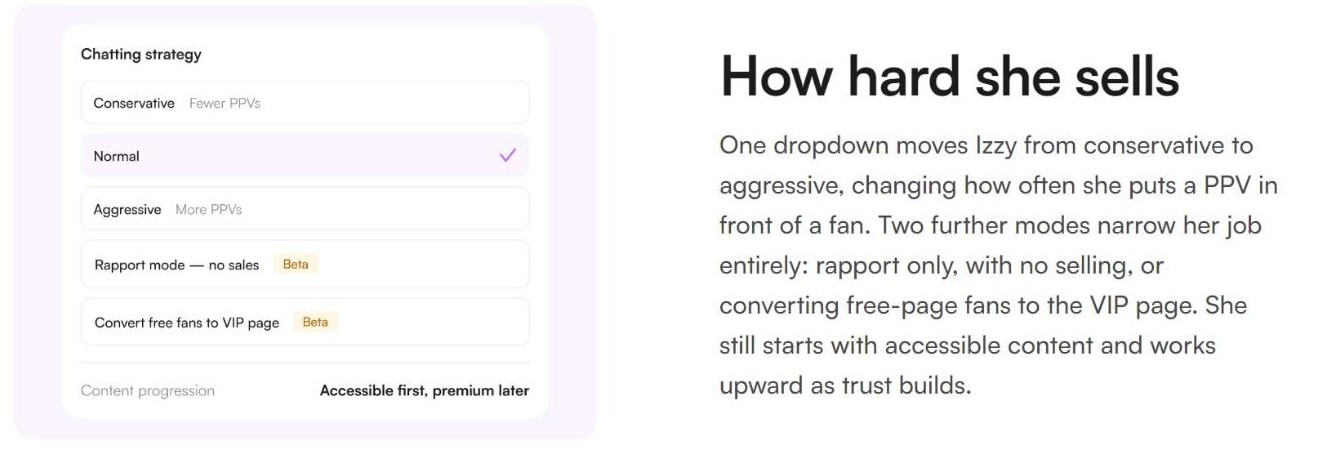
Five chatting strategies, two of them marked Beta (screenshot from supercreator.app)
Supercreator AI Chatter selling intensity is a single dropdown with three settings – conservative, normal, aggressive – which changes how often paid content is put in front of a fan. Two further modes narrow the job completely: rapport only, with no selling at all, and converting free-page fans to a VIP page. Both of those are labelled Beta in the published interface, which is a useful thing to see before you plan a campaign around either of them. Underneath sits a content progression rule the page summarises as “accessible first, premium later.”
Scheduling is per day. The documentation says time zones resolve in a fixed order – the workspace setting first, then the creator bios, with Los Angeles as the fallback – and that when the schedule turns the Supercreator AI Chatter back on, it rescans the inbox and replies to anything that arrived while it was off. Small detail, but it is the difference between an overnight gap and an overnight backlog.
Scripts: Supercreator AI Chatter sequences that run themselves
Supercreator AI Chatter scripts are built from two kinds of step. An instruction step is a prompt in your own words plus a budget for how many messages to spend on it. A message step is a specific line, optionally with a content bundle attached, and a toggle that decides whether it goes out word-for-word or gets rewritten in the creator’s voice. Steps can be added, reordered and deleted.
Triggers are written as sentences rather than picked from a dropdown, and the page says anything the Supercreator AI Chatter could reasonably know is fair game – something the fan said, how long they have been subscribed, the time of day in the creator’s time zone. Two rules then stop the whole thing from feeling mechanical: no fan is ever run through the same script twice, and no fan receives a script containing content they have already bought. If a fan loses interest mid-sequence, the script is dropped and normal chat resumes.
Languages, and why the Supercreator AI Chatter keeps one per thread
Allowed Supercreator AI Chatter languages are part of the creator bio rather than a global switch, so a persona can be given the languages that fit its audience and refused the ones that do not. The behaviour rule underneath is the interesting bit: the Supercreator AI Chatter picks a language from the fan’s first message and holds it for the rest of the thread, switching only when the fan asks. The stated reason is blunt – “bouncing between languages mid-conversation is what makes a fan suspicious.”
Separately, human chatters get an inbox-wide translation toggle. Turning on “Translate all chats” shows every fan and creator message with a translation, and once a fan’s language is set, outgoing replies are translated too. It covers the whole inbox with no per-chat setup, which makes it useful to teams that have not switched any automation on at all.
What the Supercreator AI Chatter knows about each fan
Before replying, the Supercreator AI Chatter reads the entire chat history with that fan – the page points out that a human chatter, and often the creator, cannot scroll back that far. Alongside every conversation sits a Fan Insights panel, visible to the human team as well, combining spend across the creator’s free and paid pages so a fan who bought on one page and is chatting on the other still shows a real value. Buy rate is presented as the quickest read on whether somebody is a top spender.
Voice comes from two places: a creator bio covering personality, writing style, tone, background and avoided subjects; and pre-trained personas that replicate common chatting styles, which you pick from and tune. The company says it analyses existing chats and content during onboarding to build the writing style, and that the result can be updated from the dashboard as a brand evolves.
Finding three: the live feed keeps seven days
The Supercreator AI Chatter real-time monitoring feed is the operational centre of the product. It streams messages received and sent, sales and tips, status changes between online and paused and off, chat escalations, low-credit warnings, and any state change a team member made by hand. Each entry carries a plain-language reason and an exact time, and the company says it is the first place its own support team looks.
The retention is stated on the same page: the feed “holds the past seven days, then tells you you’ve reached the end.” That is a design choice rather than a flaw, and the platform has a separate activity log with CSV and PDF export for payroll and audit work. The point is simply that these are two different tools. If a dispute with a chatter or a fan surfaces three weeks later, the live feed will not have it, and anyone planning to rely on the feed as a record should know that before they need it.
Who the Supercreator AI Chatter suits
Agencies running several accounts with a chatter team are the clearest fit for the Supercreator AI Chatter. The Supercreator AI Chatter escalation queue, the role-based alerting, the exclusion lists and the per-creator guardrails all assume more than one person and more than one persona, and most of them are pointless for a solo creator who answers every message themselves.
Teams working across time zones are the second fit, for the plainest reason – the schedule plus the inbox rescan covers the hours nobody is awake. Multilingual audiences are a third, and the translation toggle is usable even if no automation is switched on.
It fits less well in two situations. A creator whose brand rests on personally answering every message is buying a tool whose main value is not doing that. And anyone who needs a long retrievable record of what was said should plan around the activity log rather than the seven-day feed. The plan comparison on the pricing page is the quickest way to see which tier carries which of these modules.
Transparency, platform rules and the law
Three separate obligations get mixed together around the Supercreator AI Chatter, and they are worth keeping apart. The platform rules are OnlyFans’ own; Supercreator states that its assistant “operates within OnlyFans’ terms of service,” which is the vendor’s position and not an independent finding. The moderation categories listed earlier are the company’s implementation of those rules.
Disclosure to fans is the second, and it sits with the operator. The vendor recommends it; nothing in the Supercreator AI Chatter forces it. The third is law, which has moved faster than most of this market: the EU Artificial Intelligence Act sets transparency duties on those who deploy AI systems that interact directly with people, and those duties attach to whoever runs the account, not to the software company. Anyone selling to European fans should read that text rather than take a vendor FAQ as the last word, and this review is not legal advice.
How this review of the Supercreator AI Chatter was done
This is a desk review. Everything above comes from the Supercreator AI Chatter pages the company publishes openly: the AI Chatter overview and its twelve-question FAQ, the seven module pages for scripts, monitoring, languages, the conversation qualifier, guardrails, fan intelligence and automation rules, and the public pricing page. Screenshots were taken from those pages on the day of writing.
No account was opened, no money was spent, and no live conversation was observed. Where a claim is the company’s, it is written as the company’s claim. Testimonial blocks, named case studies and the demo feed showing sample fan handles and amounts were deliberately left out of the screenshots. Prices and allowances change, so check them on the vendor’s current pricing page before budgeting.
The short version
The Supercreator AI Chatter earns its score on documentation as much as on features. The caps are published, the restricted categories are published in full including the unflattering ones, the escalation behaviour is described rather than hinted at, and the time-zone fallback is written down. That is more than this corner of the market usually offers.
Two Supercreator AI Chatter claims need reading twice. “Unlimited” describes conversations, not messages, and the credit meter lives on a different page. And the invisibility claim and the disclosure recommendation sit on the same page without being reconciled, which leaves a decision with the buyer that the marketing copy does not make for them.
Overall: 8.2 / 10. Strong controls, honest documentation, two places where two pages should agree and do not. If the control layer is what you are buying, start with the free CRM tier and the plan comparison and turn the automation on only after the guardrails and exclusion lists are set.







Reviews
There are no reviews yet.